Troubleshooting
App doesn't track in background
- Go to Settings > Apps > Colota > Battery and select Unrestricted
- Verify location permissions are set to Allow all the time
- Grant notification permission if you want to see tracking status
- While tracking runs the status bar shows Colota's pin, the launcher icon's mark, and the notification carries it on a teal disc
- If the notification disappeared while the app still shows tracking on, Android killed the service. Opening the app restarts it. With battery set to Unrestricted it also restarts on its own, usually within 15 to 30 minutes
- When Colota cannot restart itself it posts a Tracking stopped notification instead, and tapping that resumes tracking. It has its own notification channel, so if you never see it, check that Tracking stopped is enabled in Android's notification settings for Colota
- The time in the notification header is the last position fix Colota received. It keeps counting while a pause keeps GPS off. While you move, it only grows if location updates have stopped
Tracking doesn't start after reboot
- Make sure tracking was active before the reboot
- Do not force-stop Colota. A force-stopped app receives no boot broadcast until you open it again
- Samsung: turn off "Pause app activity if unused" for Colota (Settings > Apps > Colota > Battery)
- Xiaomi, Huawei, Oppo, Vivo, OnePlus: allow Autostart for Colota in the phone's own security or battery app
- Disable battery optimization for Colota (Settings > Apps > Colota > Battery > Unrestricted)
- Open the app once if you have not used it for months. Android resets permissions for unused apps
- Location services were off during the reboot: Android 14 and newer block the automatic start until location services are on. Colota posts a "Tracking stopped" notification instead. Tap it to resume right away, or turn location services on and tracking resumes by itself within about 10 minutes
Tracking stopped on low battery and didn't resume
Colota stops tracking below 5% (when unplugged) and resumes automatically once you connect a charger. If it doesn't:
- Only battery stops auto-resume, not manual stops - if you stopped tracking yourself, start it again from the app
- Don't force-stop the app - that cancels the scheduled resume; it recovers on the next launch or reboot
- Set the battery to Unrestricted (Settings > Apps > Colota > Battery) so the OS doesn't delay the charge-triggered resume.
- A non-charging cable (data-only, or an already-full battery) may not trigger it; a reboot while plugged in will
GPS accuracy is poor
- Wait for GPS lock (can take 30-60 seconds)
- Move to an open area away from buildings
- Check if High Accuracy is enabled in device location settings
- Enable Filter Inaccurate Locations in app settings
Trips are split or merged in the wrong place
Colota starts a new trip after a 15-minute gap in fixes, so a long stop can break one journey into several and two back-to-back activities can end up as one trip. Correct either case by hand from the Trips tab - see Editing Trips.
Server sync not working
- Check endpoint URL format - must be
https://for public endpoints, orhttp://for private/local addresses - Use Test connection under Settings > Connection; the Server card above it says what sync is doing now and, when it fails, the server's own sentence
- Check server logs for incoming requests
- Verify network connectivity
- Check the queue count in Data management
Common causes: Wrong URL, HTTPS required for public endpoints, expired SSL certificate, incorrect authentication, mismatched field mapping, self-signed / private-CA server cert (see the mTLS guide for trust setup), Sync Condition restricting uploads to a specific network (Wi-Fi, SSID or VPN), missing local network permission on Android 16+.
Test connection error messages
If Test connection reads Not reachable, the sentence under it points at the specific layer that broke:
| Message | What it means | Fix |
|---|---|---|
Server certificate is not trusted (self-signed or unknown CA) | TLS layer: Colota can't validate the server's certificate chain | Import your CA under Connection -> Client certificate -> Trusted server CA, or use a publicly trusted cert. User-installed CAs from Android Settings are not honored. |
Server requires a client certificate (mutual TLS) but none is configured | TLS layer: the server demanded a client certificate, Colota didn't present one | Add one under Connection -> Client certificate |
Server rejected the client certificate | TLS layer: cert was sent but rejected (wrong CA, expired, revoked) | Verify the cert matches what your reverse proxy expects |
Incorrect password for client certificate | Import-time: the password doesn't unlock the .p12 | Re-import with the correct password |
Hostname not verified | TLS layer: server cert doesn't list the hostname/IP you connected to | Reissue the server cert with a SAN that includes your hostname/IP |
Server returned <code>: ... | HTTP layer: TLS succeeded, but the server returned a 4xx/5xx | Check your auth headers, field mapping, and server logs |
Connection timed out | Network layer: the server didn't respond in time | Check connectivity, firewall, server availability |
Local network access denied | Permission: Android 16+ blocked the connection to a private IP | Grant Local Network Access (Settings -> Apps -> Colota -> Permissions) |
Viewing and exporting logs
Settings > Logging records a log file and hands it over as one file.
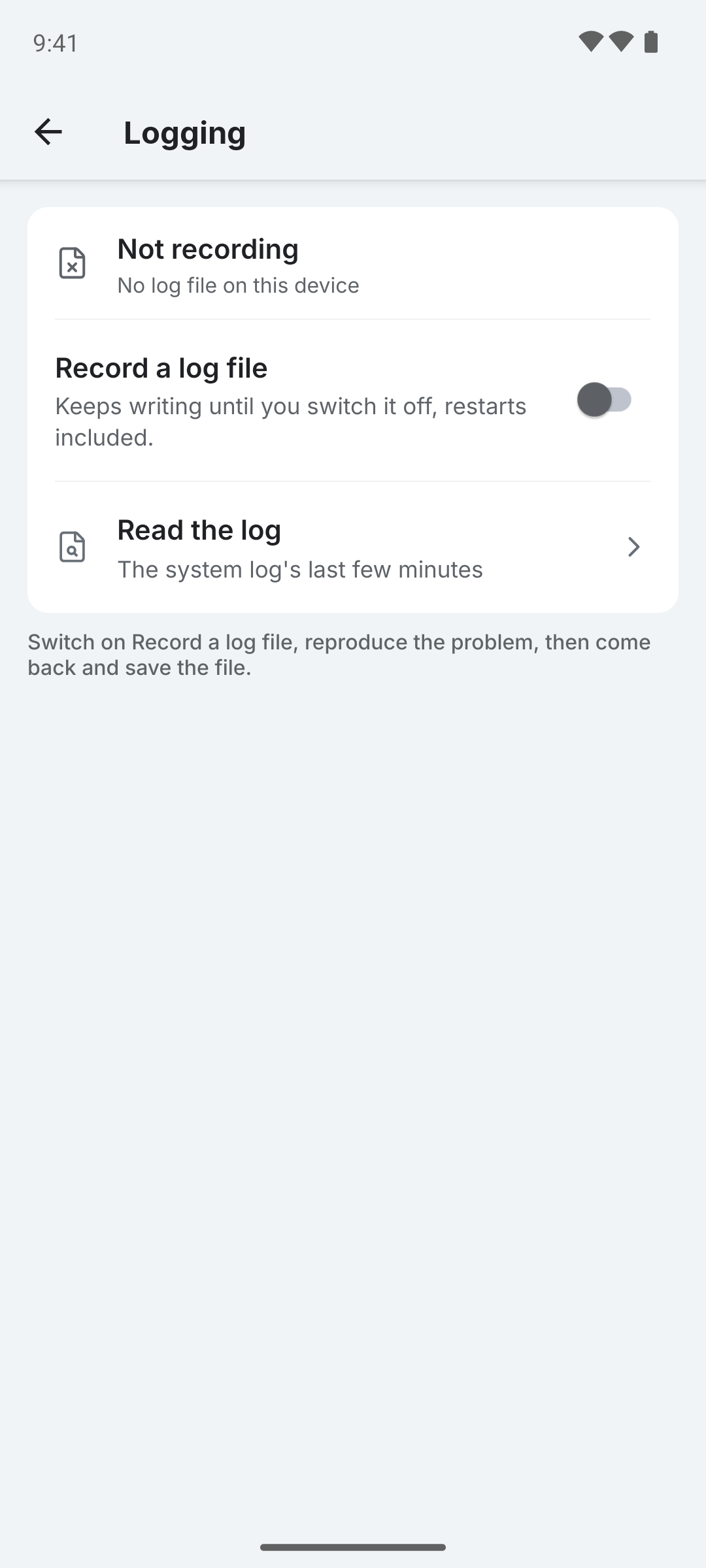
Recording a log
- Open Settings > Logging and turn on Record a log file
- Use the app until the problem happens again. Recording keeps going across restarts, so this can take days
- Come back and tap Save log file - pick a folder
- Open a bug report at github.com/dietrichmax/colota/issues and attach the saved
colota-log-*.txt
Step 2 is the one people skip. A log saved without reproducing the problem contains everything except the thing being reported.
The saved file is one timeline: your app version, flavor and device at the top, then the native and app log lines interleaved by the time they happened. A marker says where the app log's own coverage begins, because it only spans the current app session while the recorded file spans restarts.
Reading it first
Read the log opens a preview of the most recent lines. Search filters on the message, and the chips set the lowest level shown, each carrying its own count so you can see there are four errors without selecting Errors.
The preview shows the recorded file while recording is on, and the system log's last few minutes while it is off. It shows the most recent lines only, so a long capture holds far more than you can read here.
Heads up: the file names your geofences, your tracking profiles and your server host. Colota writes no coordinates into it, but a rejected upload can carry your server's reply, which may. Read it before you attach it.
The file grows the whole time recording is on. Delete the log file clears it and, if recording is still on, starts a fresh one.
Debugging with adb logcat
Filter logs to see what Colota is doing:
adb logcat | grep -E "LocationDB|NetworkManager|SyncManager|LocationService|GeofenceHelper"
Key log tags:
| Tag | What it shows |
|---|---|
LocationService | GPS fixes, service lifecycle |
SyncManager | Queue processing, retry attempts |
NetworkManager | HTTP requests, endpoint validation |
LocationDB | Database operations |
GeofenceHelper | Zone detection |
AutoExportWorker | Scheduled export execution |
You can also use the Location History screen in the app to see recorded locations on a track map or as a list with their accuracy and timestamps.
Local server not reachable (Android 16+)
Starting with Android 17, connecting to local/private network addresses requires the Local Network Access permission. Colota requests this automatically when you test a local endpoint.
On some Android 16 devices, this may already be enforced via security patches using the Nearby Wi-Fi Devices permission instead.
If sync to a local server stopped working after an Android update:
- Go to Android Settings > Apps > Colota > Permissions
- On Android 17+: Grant the Local network access permission
- On Android 16: Grant the Nearby devices permission
- Use Test connection to verify
If you denied the permission and the system no longer shows the dialog, reset it from Android Settings.
Locations not syncing on certain networks
If Sync only on is set to Wi-Fi or Ethernet, a specific Wi-Fi network or VPN, uploads are skipped when the condition is not met. Locations continue to be recorded and queued locally - they sync automatically when the condition is satisfied.
To change: Settings > Tracking & sync > Sync only on.
Auto-export not working
- Verify a directory is selected in Settings > Export & import > Automatic export
- Check that the toggle is enabled
- The first export fires at the configured time, not on enable. Tap Export now to confirm the pipeline works without waiting
- Doze mode can delay an alarm by up to ~15 minutes - if exports are running but a few minutes late, that's expected
- If you see a "Directory permission lost" notification, re-select the export directory
- Check that the selected directory still exists and is accessible
- Transient errors (I/O failures) retry up to 3 times automatically; permanent errors (invalid config, directory issues) fail immediately without retrying
- If old exports seem to disappear, check the File Retention setting - by default only the last 10 files are kept
- Check the
Colota.AutoExportAlarm,Colota.AutoExportSchedulerandColota.AutoExportWorkerlog tags in native logs for details
Database growing too large
- Use Delete synced locations to remove what your server already holds
- Use Delete older locations for an age cutoff, which ignores sync state
- Back up or export first if you want to keep it
- Use Compact database to reclaim space after deleting trips or points, which leave gaps nothing else reclaims
Size reference: ~200 bytes per location, ~2 MB per 10,000 locations.