Geofencing
Create zones where location recording stops automatically. These "pause zones" stop saving locations at places you visit often. Each zone can also be configured to stop GPS entirely when on WiFi or when the device is motionless.
Use Cases
- Home - Don't track when at home
- Work - Stop recording during work hours
- Frequent locations - Save battery in places you visit often
Setup
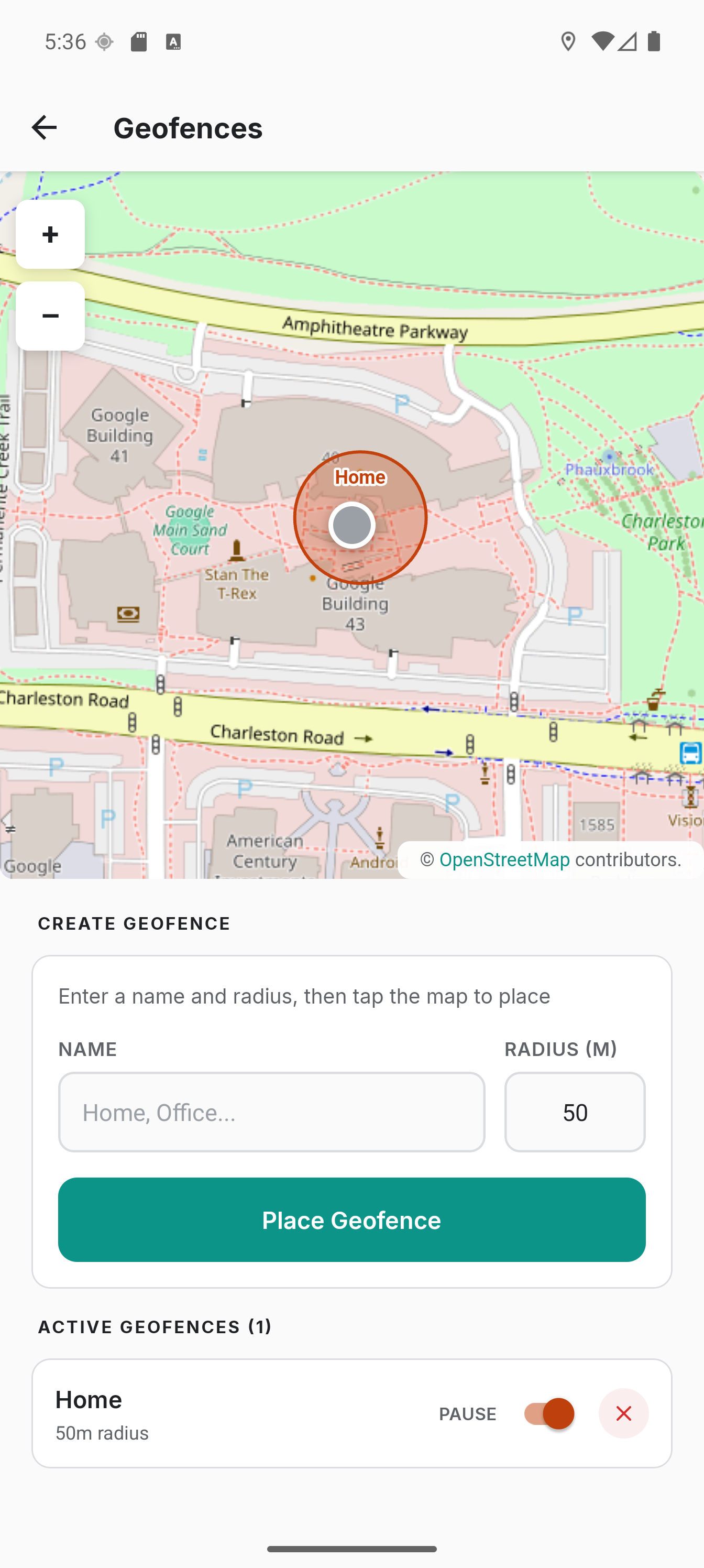
- Go to the Geofences tab
- Tap + in the top bar
- Give the zone a name and a radius, then tap Location and pick a point on the map. The dot marks where you are; while tracking, the locate button places the zone at your position
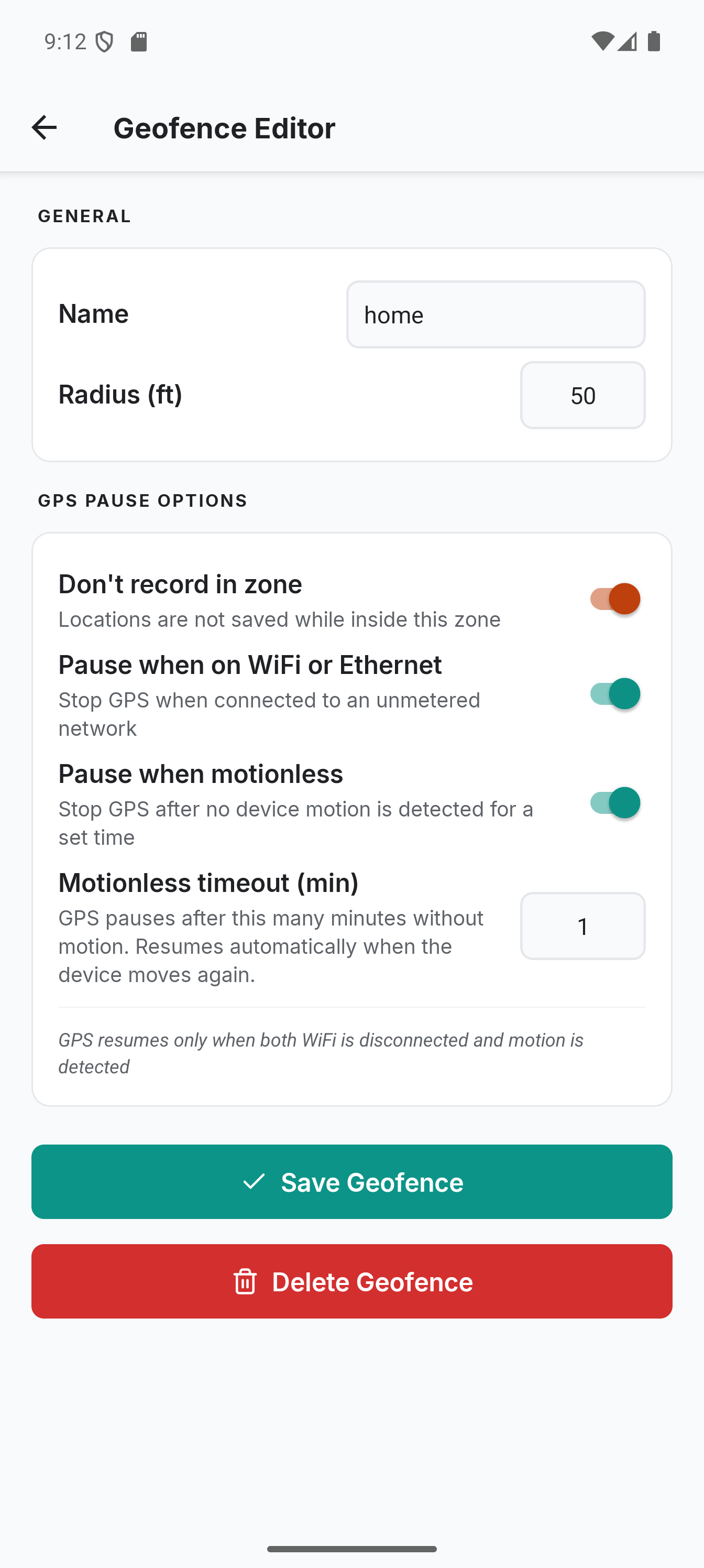
- Set the pause options, then tap Save geofence
Tap any zone in the list, or its circle on the map, to reopen the editor. Every field can be changed there, Location included. The zone you are paused in reads Paused here in the list.
GPS Pause Options
Each geofence has independent pause settings, configured in the editor:
Don't record in zone
New locations are not saved while inside the zone. GPS continues running to detect when you leave. This is the default behavior.
Syncing is not paused. Anything already queued keeps uploading under your normal sync rules, and entering a zone flushes the queue so your backend sees the arrival.
This is also the master switch for the other pause options below. WiFi pause, motionless pause and the stationary heartbeat only take effect when this is on.
Pause when on WiFi or Ethernet
Stops GPS entirely when connected to an unmetered network (home WiFi, Ethernet). GPS resumes automatically when the connection is lost. Useful if you want to completely stop GPS while at home on WiFi, saving additional battery.
Pause when motionless
Stops GPS after the device has been still for the configured time (default 1 minute, minimum 1 minute). Stillness is detected automatically via the accelerometer; any motion above the detection threshold resets the timer. GPS resumes within seconds when the device moves again. Useful for users who put their phone in airplane mode at night or sit still for long periods.
Stationary heartbeat
Records a point at the geofence center at a set interval while paused inside the zone, as a synthetic fix that does not wake GPS. Useful as a proof-of-presence signal so your backend knows the device is still there.
The point is always saved on the device, including in offline mode and when the server is unreachable. Sending it is separate: it goes out under your normal sync rules, so a Wi-Fi-only or SSID condition still governs the upload while the stay is recorded either way. The first point is recorded on zone entry, then one per interval. Minimum 1 minute, default 15. Treat the interval as a minimum rather than a schedule: Colota uses an inexact alarm so it does not need the exact-alarm permission, and Android delivers those late.
Combined behavior
When both WiFi and motionless pause are enabled, GPS only resumes when both conditions clear - WiFi must be disconnected and motion must be detected. Either condition alone is not enough to resume.
Changes made in the editor take effect immediately, even when you are already inside the zone.
Sharing Zones
You can share all your geofences with another device or another user via a setup link instead of recreating zones by hand.
- Open the Geofences screen
- Tap the share icon in the top bar
- The system share sheet opens with a
colota://setup?config=...link - Send the link through any messenger, email or as a QR code
When the recipient opens the link, Colota shows the import confirmation screen listing every incoming zone. By default, tapping Apply Configuration appends the zones to the recipient's existing list. A "Replace zones with the same name" toggle on the confirmation screen swaps incoming zones for any existing zones whose names match - the original zones are deleted before the new ones are created.
The share button is all-or-nothing - every zone in the list is included. The id, createdAt and enabled fields are stripped, so imported zones always start enabled and get fresh database entries on the recipient's device.
To share zones together with your tracking, sync and API settings in a single link, use Settings -> Share setup instead (see Deep Link Setup).
See the Deep Link Setup guide for the full payload format.
How It Works
- Zone detection uses the Haversine formula (1-2ms per check)
- When entering a pause zone, Colota keeps recording for 3.5× your tracking interval before pausing - this logs several real arrival points near the zone boundary, which backends like GeoPulse need to confirm a trip has ended. The delay uses your configured interval.
- The notification shows "Paused" with "Inside zone", "Zone WiFi" or "No movement" and when tracking resumes. The zone name only appears on the Dashboard
- By default, GPS continues running inside the zone to detect when you leave. If WiFi pause or motionless pause is enabled, GPS stops entirely inside the zone and zone exit is detected when GPS resumes
- If you leave before the entry delay completes, the delay is cancelled and tracking continues uninterrupted
- Switching tracking profiles during the entry delay does not skip or restart it
- A stationary profile stays active inside a zone, but records nothing while WiFi pause or motionless pause has GPS off
- When exiting the zone, tracking automatically resumes
- If GPS goes quiet while paused (for example, indoors for a long stretch), Colota periodically requests a fresh position to check whether you have left
- Zone checks happen every location update with minimal overhead
- You can create unlimited geofence zones
Anchor Points
When you exit a pause zone, Colota saves a synthetic location at the geofence center. This gives your new trip a clean start point rather than somewhere mid-road where GPS first locks in. Anchor points report accuracy 0 so they pass any downstream quality filter and are recognizable as synthetic in backend data, and are timestamped 1 second before the first real GPS fix after leaving the zone, ensuring correct chronological order.