Deep Link Setup
Configure Colota instantly using a colota://setup URL. Generate a link or QR code with your server settings and share it with users - no manual typing required.
Link Generator
Fill in the settings you want to configure. Only the fields you set will be included - everything else keeps its current value on the device. All processing happens in your browser - no data is sent to any server.
Fill in at least one field above to generate a setup link.
Sharing From the App
You can also generate a setup link straight from an existing installation, without the browser generator. Open Settings → Share setup, tick which categories to include - Tracking, Sync, API, Geofences, Tracking profiles and Credentials - and tap Share to send the colota://setup link through any app.
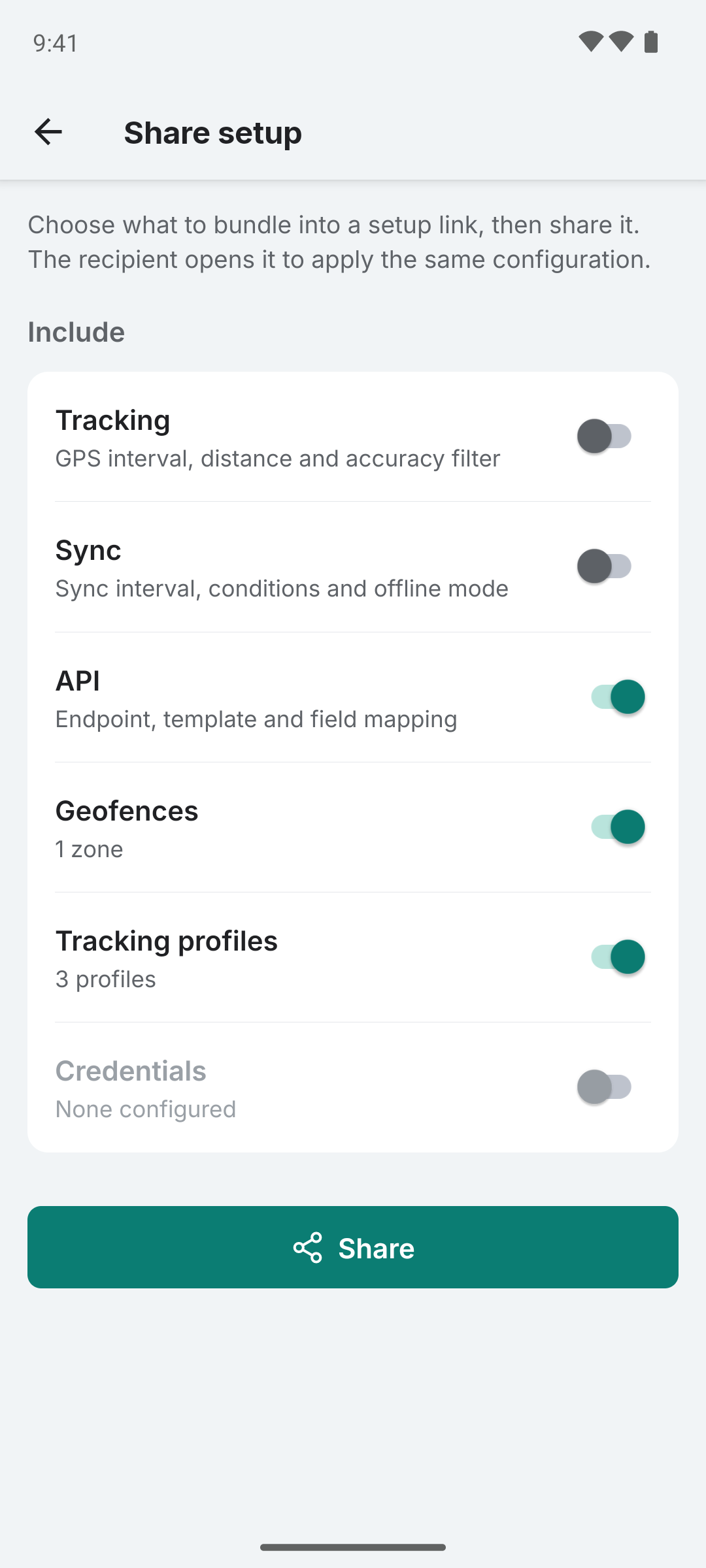
Credentials are off by default. Enabling them puts your username, password, bearer token or custom headers into the link in plain text, so only share it over a trusted channel.
Geofences and tracking profiles can also be shared on their own from the Geofences and Tracking profiles screens.
How It Works
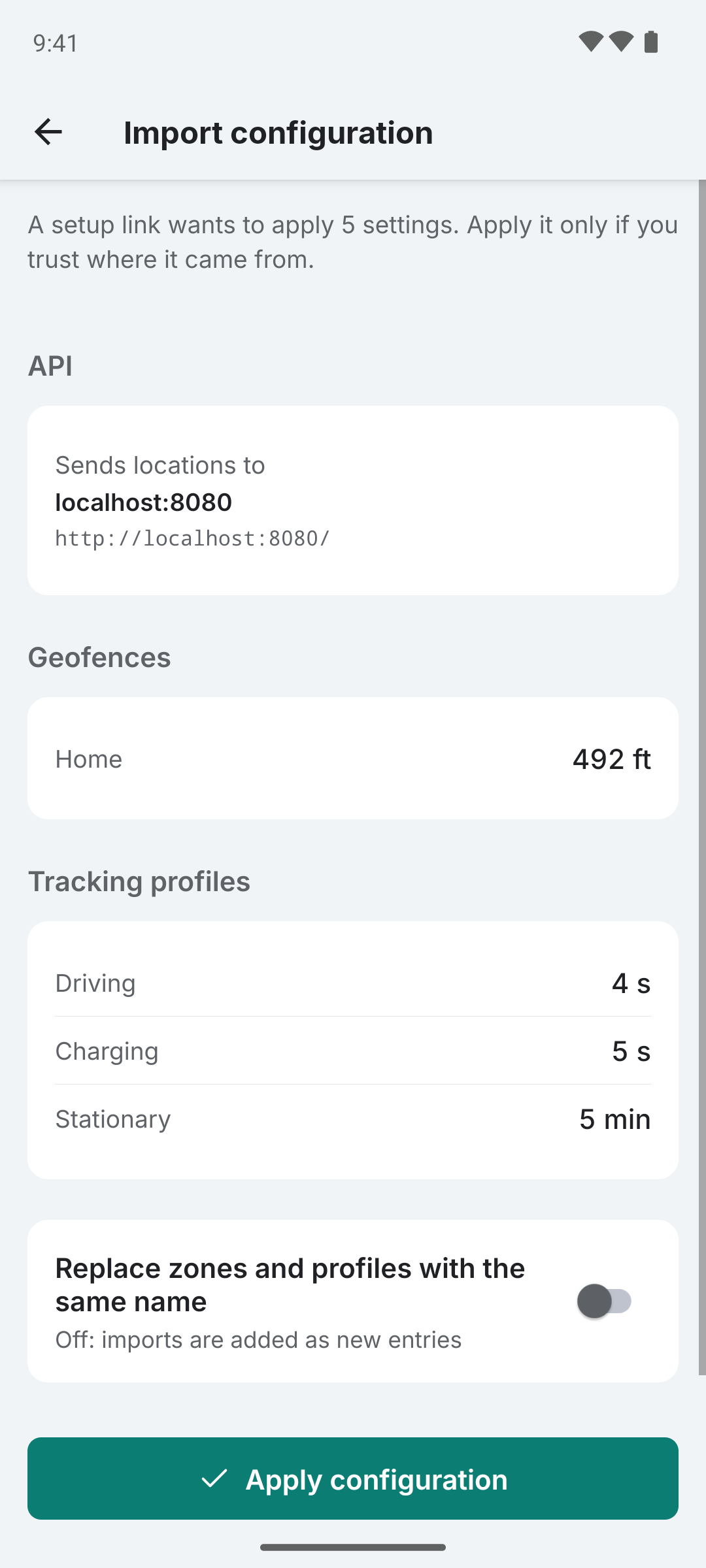
- User taps the link or scans a QR code
- Colota opens and shows a confirmation screen listing all settings that will be applied. The server address is shown in full with its host on a separate line. A link that replaces a configured server names the server it replaces.
- Sensitive values (passwords, tokens) are masked in the preview
- User taps Apply Configuration to save or Cancel to discard
- Settings are persisted, a running tracking session restarts with them, and the app navigates to the Dashboard
URL Format
colota://setup?config=BASE64_ENCODED_JSON
The config parameter is a base64-encoded JSON object. Only include the settings you want to change - everything else keeps its current value.
Parameter Reference
| Parameter | Type | Description |
|---|---|---|
endpoint | string | Server URL to send location data to. A host written as user@host or containing a backslash rejects the whole link. |
interval | number | GPS polling interval in seconds (must be > 0) |
distance | number | Minimum movement in meters before recording a new location |
syncInterval | number | Batch sync interval in seconds (0 = instant) |
accuracyThreshold | number | Discard locations less accurate than this (meters) |
filterInaccurateLocations | boolean | Enable accuracy filtering |
isOfflineMode | boolean | Store locally only, never sync |
syncCondition | string | any, wifi_any, wifi_ssid, or vpn |
syncSsid | string | Wi-Fi SSID to sync on (only used with wifi_ssid) |
apiTemplate | string | custom, dawarich, geopulse, overland, owntracks, phonetrack, reitti, or traccar |
httpMethod | string | POST or GET |
dawarichMode | string | single (OwnTracks endpoint) or batch (Overland endpoint). Only applies to apiTemplate: dawarich. |
overlandBatchSize | number | Points per batch POST for Overland format (1-500, default 50). Used by apiTemplate: overland and dawarich + batch. |
fieldMap | object | Custom field name mapping for the JSON payload |
customFields | array | Static key-value pairs added to every payload |
auth.type | string | none, basic, or bearer |
auth.username | string | Username for Basic Auth |
auth.password | string | Password for Basic Auth |
auth.bearerToken | string | Token for Bearer Auth |
customHeaders | object | Custom HTTP headers (e.g. Cloudflare Access) |
geofences | array | Pause zone definitions (see Geofences) |
profiles | array | Tracking profile definitions (see Tracking profiles) |
Geofences
Each entry in the geofences array describes one pause zone. name, lat, lon and radius are required. Other fields fall back to safe defaults.
| Field | Type | Default | Description |
|---|---|---|---|
name | string | (required) | Display name |
lat | number | (required) | Latitude in decimal degrees |
lon | number | (required) | Longitude in decimal degrees |
radius | number | (required) | Radius in meters, must be > 0 |
pauseTracking | boolean | false | Stop saving locations inside the zone |
pauseOnWifi | boolean | false | Also stop GPS while connected to Wi-Fi or Ethernet |
pauseOnMotionless | boolean | false | Also stop GPS after no motion for motionlessTimeoutMinutes |
motionlessTimeoutMinutes | number | 10 | Minutes of stillness before motionless pause kicks in |
heartbeatEnabled | boolean | false | Record a point at the zone center while paused |
heartbeatIntervalMinutes | number | 15 | Heartbeat interval in minutes |
Imported geofences are appended by default. The import confirmation screen has a "Replace zones with the same name" toggle that deletes existing zones whose names match before creating the incoming ones.
You can build links with geofences using the in-browser generator above, the Node.js or Python snippets below, or by sharing zones directly from the Geofences screen in the app (see the Geofencing guide).
Tracking profiles
Each entry in the profiles array describes one tracking profile. name, interval, distance, syncInterval and condition are required. Other fields fall back to safe defaults. id and createdAt are ignored on import - the receiving device always creates fresh rows.
| Field | Type | Default | Description |
|---|---|---|---|
name | string | (required) | Display name |
interval | number | (required) | GPS interval in seconds (must be >= 1) |
distance | number | (required) | Movement threshold in meters |
syncInterval | number | (required) | Sync interval in seconds (0 = instant) |
condition.type | string | (required) | charging, android_auto, speed_above, speed_below, or stationary |
condition.speedThreshold | number | - | Required for speed_above / speed_below. Speed in m/s (divide km/h by 3.6) |
priority | number | 10 | Higher value wins when multiple profiles match |
activationDelay | number | 0 (stationary: 60) | Seconds the condition must keep matching before the profile is applied (0 = immediate). For stationary, how long the device must be still before activating |
deactivationDelay | number | 60 (stationary: 0) | Seconds to keep the profile active after the condition stops matching. Stationary resumes via the motion sensor instead |
Imported profiles are appended by default. When both profiles and geofences are present the same "Replace ... with the same name" toggle on the import screen also deletes existing profiles whose names match before creating the incoming ones.
You can build links with profiles using the in-browser generator above, the Node.js or Python snippets below, or by sharing profiles directly from the Tracking profiles screen in the app.
Generating Links Programmatically
Using Node.js
node -e "
const config = {
  endpoint: 'https://my-server.com/api/locations',
  interval: 10,
  apiTemplate: 'owntracks',
  auth: { type: 'bearer', bearerToken: 'my-token' },
  geofences: [
    { name: 'Home', lat: 52.52, lon: 13.405, radius: 100, pauseTracking: true }
  ]
};
const encoded = Buffer.from(JSON.stringify(config)).toString('base64');
console.log('colota://setup?config=' + encoded);
"
Using Python
python3 -c "
import json, base64
config = {'endpoint': 'https://my-server.com/api/locations', 'interval': 10}
encoded = base64.b64encode(json.dumps(config).encode()).decode()
print(f'colota://setup?config={encoded}')
"
Security Notes
- The configuration URL is not encrypted. Avoid putting sensitive tokens in QR codes displayed in public.
- All settings are shown to the user for confirmation before being applied.
- A link whose server address is rejected cannot be applied at all. The screen shows the reason and offers only Go back.
- Any app, web page or message can open a
colota://setuplink. Apply one only if you trust where it came from, and read the host under Sends locations to before applying.