Data management
Manage your location database from the Data management screen.
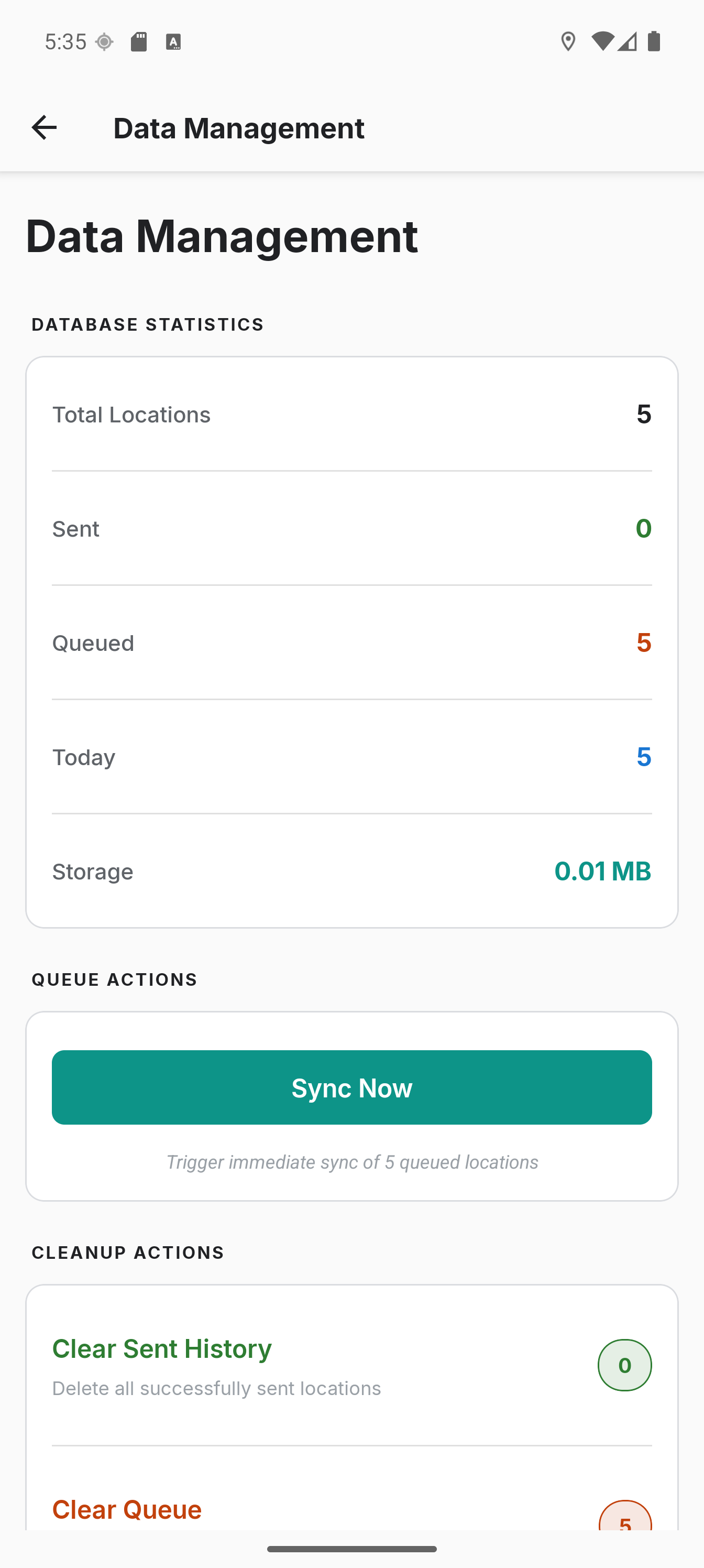
What the screen holds
Stored on this device is the ledger: how many locations this device holds and what they take on disk.
| Control | What it does |
|---|---|
| Sync now | Uploads the queued locations immediately, whatever Sync only on says. A sync already running finishes first. The tracking notification appears for a moment if tracking was off, and nothing is recorded |
| Compact database | Rewrites the database to give unused space back. It deletes nothing. Deleting trips and points from Location History leaves gaps that only this reclaims, so press it after a round of track editing |
| Delete queued locations | Deletes the locations waiting to upload, not their pending uploads. Nothing else holds a copy, so they leave Location History too |
| Delete synced locations | Deletes locations already on your server. Those days leave Location History, notes included, and imported locations count as synced. Copies on your server stay |
| Delete older locations | Deletes every location recorded before the age you pick: 30 days, 90 days, 1 year or a custom number of days. Sync state is ignored, so queued locations go with the rest |
| Delete all locations | Deletes every location and every manual trip split and merge you made. Geofences, profiles and settings stay |
Each delete row names its own count before you press it, and Delete all takes the Locations figure at the top. No age is chosen when the screen opens, so nothing is counted until you pick one. Every delete asks you to confirm, and none can be undone.
In offline mode nothing new is queued, so Sync now and both sync-scoped deletes leave the screen. Locations queued before you turned it on are still there, and the age delete and Delete all still reach them.
Location History deletes single points and whole trips, see below. Export lives on its own screen, see Data Export, and so does import, see Data Import.
For a full archive of locations, settings and credentials in a single password-encrypted file, use Settings > Backup & restore - see Backup & restore.
Deleting from Location History
The actions above work on the whole database. To remove specific recordings, use the Location History screen.
Trips
From the Trips tab, long-press a trip card to enter selection mode, add any other trips you want to remove, then tap the trash icon in the selection header. You'll be asked to confirm before the underlying location points are permanently deleted from the device.
Single-trip delete is also available from the Trip Detail screen via the trash icon in the header.
To correct how points are grouped into trips rather than remove them, see Editing Trips.
Single points
A stray fix can land far from where you actually were, which drags the track and the day's distance with it. On the Map tab, tap the point to open its card, check the time and accuracy to make sure it is the one you mean, then tap the trash icon next to the close button. You'll be asked to confirm. The Data tab lists every point of the day; tapping a row opens the same card.
Only that one point is removed, so the rest of the trip stays intact. If the point had not synced yet, its pending upload is dropped with it.
The same card carries a split icon, which starts a new trip at that point instead of removing it - see Editing Trips.
Deleting locally does not remove anything already uploaded to your server.
Imported locations and the queue
Locations brought in via Data Import are marked as already synced by default, so they do not show up in the queue counter and don't get re-uploaded to your backend. If you switched on Also queue for upload on the import preview instead (the "migration" path), the imported rows do land in the queue and the next sync drains them - the counters here will reflect that until they finish uploading.
Storage Reference
- ~200 bytes per location
- ~2 MB per 10,000 locations