Tracking Settings
Found under Settings → Tracking & sync → Recording. Positioning accuracy and Accuracy filter have their own groups further down the same screen.
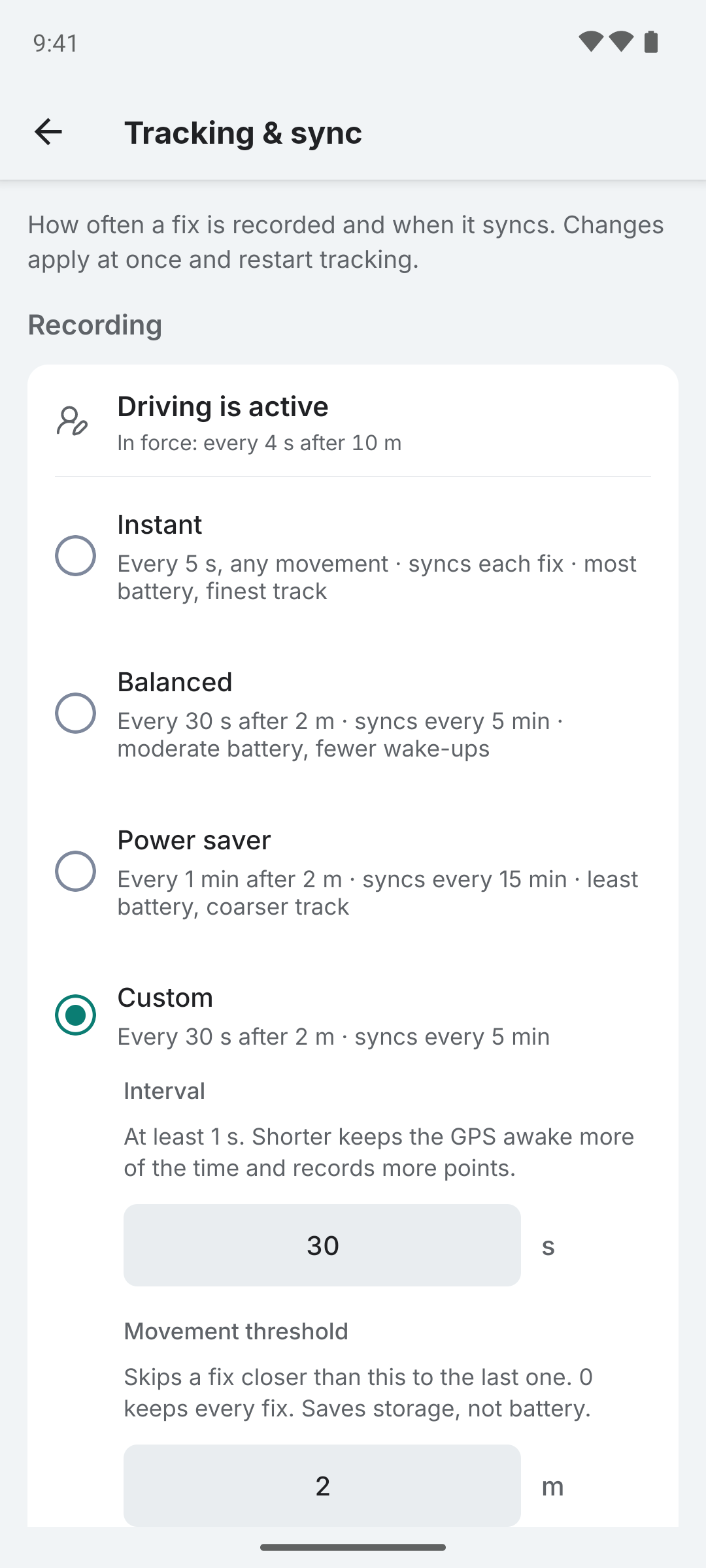
Available Settings
| Setting | Description | Default | Accepted values |
|---|---|---|---|
| Interval | Time between GPS fixes | 5 seconds | ≥ 1 s |
| Movement threshold | Minimum movement to keep a fix | 0 | ≥ 0 |
| Positioning accuracy | High-precision or battery-saving fixes | High accuracy | High accuracy / Lower accuracy |
| Filter inaccurate locations | Enable/disable accuracy filtering | Off | On/Off |
| Accuracy threshold | Drop fixes rated worse than this | 50 | ≥ 1 |
The interval and movement threshold sit under Custom in the Recording group; picking a preset sets both. The two distance settings use whichever unit you picked in Settings → Appearance, so they read as meters or feet. Every number field takes whole numbers only and states its minimum under its label; a value below it is set to the minimum when you leave the field. There is no upper limit on any of the three numbers.
If a tracking profile is active, it supplies its own interval, movement threshold and sync interval for as long as its condition holds. The Recording and Sync interval groups then open with a line naming the profile and the values in force, and the rows below stay the defaults the app falls back to when no profile applies. A profile is the usual reason fixes arrive at a different rate than the one set here.
Interval
How often the app requests a GPS fix. Shorter intervals keep the GPS awake more of the time and record more points.
- 1-5 seconds: High detail, suitable for driving or cycling
- 15-30 seconds: Good balance for walking or commuting
- 60+ seconds: Low battery usage, suitable for long trips
Movement Threshold
Only records a new location if you've moved at least this far since the last recorded point. Both the interval and this distance must pass before a fix is kept, so a higher threshold saves storage and sync data rather than battery. It is not applied inside a pause zone or by a stationary profile.
- 0: Record every GPS fix (default)
- 10-50 m: Skip stationary updates, good for daily use
Positioning Accuracy
How precise the continuous location stream is. The exact effect depends on the phone and its ROM.
- High accuracy (default): the most accurate fixes, using more battery. This is what Colota has always used.
- Lower accuracy: coarser fixes that use less battery and can arrive without bearing or altitude.
Only the continuous stream follows this setting: the one-shot fresh fixes behind geofence exit, the pause watchdog and the stationary heartbeat stay on High accuracy, so a network fix can't falsely end a pause. Changing the setting restarts tracking, so it applies at once.
Without Google Play services the effect depends on the ROM. GrapheneOS and Android 15 and older keep GPS on, so Lower accuracy changes nothing there. On Android 16 and newer, and with microG, it can mean network fixes only or none at all. If points stop arriving, switch back to High accuracy.
With the Accuracy filter on, a strict threshold can drop Lower accuracy fixes. They often carry no speed, so a stationary profile can resolve late - or not at all with intervals over a minute or network-only fixes - and the position-jump filter can't compare speed on them.
Accuracy Filter
When on, fixes the chip rates worse than the threshold are dropped. A stricter threshold leaves gaps indoors and in dense streets, where every fix is rated poorly. The switch's own caption carries the threshold in both states, so turning the filter off hides the field without losing the number.
The accuracy value comes from the GPS chip's own estimate of its confidence, not from ground truth. Chips sometimes report a tight accuracy on a position that is badly wrong, and no threshold can reject those, because the fix does not admit to being imprecise. If a stationary device is filling your history with drift, the Movement Threshold is the setting that keeps those points out of the log.
The Google Play variant uses Android's HIGH_ACCURACY positioning mode via FusedLocationProvider, which combines GPS, Wi-Fi, and cellular data. The FOSS variant requests the same high-accuracy mode from the platform's fused location provider on Android 12+ and falls back to GPS_PROVIDER on older versions or ROMs without a fused provider.
Position-Jump Filter
Some GPS chips occasionally emit a single fix that's far off (10s of km) with a wrong altitude but tight reported accuracy. The accuracy filter can't catch these because the chip lies about its own confidence on those fixes.
Colota drops these automatically by comparing the chip's reported speed against the speed implied by the distance and time since the previous fix. When the two disagree by a wide margin, the fix is discarded. The filter is always on, has no user setting, and only triggers on this specific glitch pattern - normal travel passes through because the chip-reported and implied speeds agree closely.
See also
- Sync Presets - how often the queue is flushed to your server, and on which connections
- Tracking profiles - switch interval and movement threshold automatically on charging, speed or a stationary phone
- Geofencing - pause GPS entirely inside a zone